Surface Tension Uncut - Re-Adding Cut Areas/Scenes (Expansion Project)

Thanks man.

No video tonight. The compiler crashed once during G compile about 25 minutes in (generic Steam error) and just crashed during H compile literally right at the end (about 25 minutes in as well). So, I’ve had to compile each map twice (just started H a second time). And I still haven’t done the test runs/packaging yet! I’m tired as knobs, so definitely want to hop straight into bed after release.

I’ll record the video tomorrow most likely, and the video release will most likely coincide with ST Uncut v2 Final’s release, which will very hopefully be tomorrow as well, provided there aren’t as many crashing issues as there were in the beta. Fingers crossed! Otherwise, I’ll have to spend tomorrow fixing that, rather than working on B2.

This may be very late, but I think part of the crashing issues have to do with IIopn’s Animation Revamp Project (which is a really cool mod in my opinion) because I’ve gotten a lot less crashes without it than I did when I had it installed into my BMS folder.

Oy vey. I hadn’t seen the clutter in BM’s bugtracker, that does help put things into perspective.

I give up, for now. Really frustrated. I’ve spent the past 3 hours trying to get this to work, compiling new versions, etc, but it’s no good. It’s 3am here, and everything works, except the compiled version of G will not build cubemaps. It keeps getting to the final one and then crashing, and not saving the cubemaps. I’ve tried all kinds of trickery to get it to work but I think for now I need to sleep on it and fix it in the morning. It’s all that’s left though.

Sorry guys, things just legitimately went to shit after I decided the maps were ready. The compilers crashed at the end of EVERY MAP (wasting about an hour and a half TOTAL), then when I found out the cubemaps weren’t working on G (H and I are fine), I had to recompile the map 2 times. It sucks. Sorry. Shit happens, it’s got me quite angry.

I’m sure I’ll find a fix for it tomorrow. Worst comes to the worst, I’ll just delete a few extraneous cubemaps. That normally ends up fixing it, from my experiences with crashing cubemaps in the past. I’d prefer not to, but I will if I have to. For now, I disappear off to the land of nod, however. Sorry guys. They really are actually completely ready - but fuck the Source engine. Seriously.

Frustration plays a key role. Fire up a game tomorrow morning and refresh your batteries a little before diving into it again. It may be a pain in the ass, but hey, it’s the last leg. Good luck.

Shame Text! I guess you didn’t prepare for ‘Unforeseen Consequences’?

[COLOR=‘Red’]Update: v2 RC1 Released![/SIZE]

Latest Version: 2.0 Release Candidate 1. Download here.[/SIZE]

Right, here it is, a bit later than expected - Release Candidate 1 of ST Uncut V2!

The aim of this Release Candidate Phase, which was not something I’d originally intended to do, is 2 things:

  1. To determine whether the crashing people have been experiencing has been resolved.

  2. To quickly test the waters of a few “experimental changes”.

I really have no other goals with the Release Candidate, as I consider this to basically be the finished version of ST Uncut v2. As such, please do not post minor feedback as I simply don’t have the time to work through another phase of changes. Please only post things which are invasive and impactful, as I hope to get the final release out ASAP!

If you wish to help me test the Release Candidate properly, there are some things I’d appreciate you doing to help me speed along the testing process. I’ll outline them for 1 and 2 respectively:

  1. If using Ilopn’s Animation Revamp Project, could you please test my mod with it uninstalled. Though I haven’t verified it personally yet, PCGameCrazy reported that his game seemed to crash a lot less during ST Uncut when he uninstalled it. It’s possible that it might cause problems though I don’t know for sure. Any crashes which occur, could you possibly report to me what the error was (if any) and what you were doing at the time when it crashed. The more detailed the better.

  2. The changelog below contains 4 “experimental changes”. These are all fairly majorish aspects of the maps which I decided to tweak for RC1, which change a few scenes a little, and haven’t asked the community about. They are also all very easy to revert back to the way they were before. Even if you give feedback on nothing else, please let me know what you think about these 4 changes. Just give a brief opinion, whether you think I should change it back or not, or any superior alternatives you might be able to think of. I’ll single the changes out from the changelog. They are as follows:

Other than that, enjoy the maps please! I’m going to start recording the video now, for release tonight hopefully. After that I’ll start work on B2, so keep an eye on the OaR Uncut thread for more news on that! Thanks everyone! Changelog here:

You may want to move the clip brushes down a number of units so it doesn’t prevent agrunt hornets from reaching the player on the car lift…

Edit: Alright, I’ve got through, but I’m still getting memory issues, it’s usually when I reload the level after I die with a quick save or transition between G/H. I can’t give any suggestions as to how to alleviate that.

“Usually” as in it sometimes occurs, other times it doesn’t.

I’m running WIN 7 x64 SP 1.
Intel Core i5-3570k CPU at 3.4 GHZ (running 3.8 GHZ; can go up to 4.2 I believe)
8 GB of RAM
and my GPU’s a NVIDIA 9600 GT (yeah, ancient card, but still works Nn wasting money)

Based on how much free time I have tonight, I might be able to help you pinpoint the cause of your crashing. If it is crashing in BM code, I should be able to tell you exactly what the issue is.

Do me a huge favor, attach your mdmp file(s) to your posts and I can attempt to debug them.

^ Done. Hope you can do something about it in the long run.

Edit: on the bright side, none of the trouble spots from before exist. So I think that’s a good one.

Edit #2: Not getting any crashes inside the gasworks… might be because of proper area portaling. Just a suggestion.
hl2_4104_crash_2013_6_24T12_49_43C0.mdmp (101 KB)
hl2_4104_crash_2013_6_24T12_47_11C0.mdmp (96.7 KB)
hl2_4104_crash_2013_6_24T12_39_19C0.mdmp (98.9 KB)

I am at work currently. It’ll be at least 9+ hours before I’ll even have a chance to debug.

That’s very kind of you, thank you. I appreciate the effort/thought on my part. I’m really very inexperienced when it comes to crashing and I don’t get them personally, so I can’t really figure out what’s causing them. It’d be good to get some kind of inkling as to what’s doing that if you are able to, provided you have the time, of course.

I’m not sure what you mean about the AGrunt projectiles being blocked. The Car Lifts are in the garage, and there are no AGrunts in the garage, and you can never get into a situation where you fight them in there?

Interesting. So it’s just the transitions/save and loads which crash now?

Shoot the corner of the door with the RPG and the Agrunts come out. The hornets are considered physics objects by the code (I think). That clip you put on the car elevator prevents them from reaching the player.

Yep. Although I dunno why it does it so fucking commonly though.

Okay, I hadn’t considered that. Yeah I can probably just lower it for that particular lift in question, I could even parent it to the lift actually, thinking about it.

I always forgot my changes to the TOW door allows players to do that. I still play it the old way myself, just because I always forget!

Good news and bad news! The bad news is that G did not crash when I was playing it but the transition to H gave me the same old ‘lump 53, allocation’ error.
The good news is that I can now jump down the pipe in Gasworks from the roof without HL2.exe crashing, so it must have been the autosave. For me going back to G from H didn’t cause a problem but returning to H gave me the ‘lump 53’ error again.

Same error as DivineShadow208…

  • Possible to change the console on those place already said (behind the destroyed tank) in those control room, u have two enormous windows, but just a little control panel and a table with a computer on it, if u place a big control panel overthere, it makes more sense and u have the prop already… (map G)

  • Purpose of the little cabinet in the TOW yard?

  • U can still use the old door to go to map H, so u don’t need to use the building, I don’t know if u forgot to make those door inaccessable or just an option to us players, so we can choose the easy way to go to map H or the difficult way to reach it?

While I wait to hear if more people are getting crashes, I am still pleased that it seems to be mostly transitional/save/load crashes now. That’s still far less than before, so progress has been made.

While we wait, I figure I’ll show you some performance benchmarks I took today to compare v1.11 of C2A5G with v2 of C2A5G. The results have been interesting and not quite what I expected. I look at this in a fair amount of detail, so if you enjoy that stuff, sit back and enjoy. I do hope I haven’t wasted my time too much here!

To take these benchmarks I used Fraps’s benchmarking feature, which is really neat. It measures the Average/Min/Max framerate of any desired section you want. I divided G up into 13 segments, based on location/amount of action. The categories map out a typical playthrough of the map in terms of progression.

The term action refers to the framerate of a section while there is fighting going on of some description. Static just means the scene is “blank,” and nothing happens aside from me running around. I made sure to take the same routes and look in the same directions on both tests for each area to ensure the most reliable results possible. Still, take them with a pinch of salt.

The rig I used to test:

Intel i5 2500K @ 3.3ghz
AMD Radeon HD 6950 @ 2GB VRAM
8GB RAM
Windows 7
Game @ 1920X1080, everything on max, full AA and AF

The results are here:


v2 Car Park (Action) - Avg: 63.331 - Min: 33 - Max: 130
v1.11 Car Park (Action) - Avg: 65.707 - Min: 42 - Max: 114

v2 Car Park (Static) - Avg: 121.499 - Min: 62 - Max: 257
v1.11 Car Park (Static) - Avg: 83.029 - Min: 54 - Max: 220

v2 Car Park (Top Floor Action) - Avg: 89.744 - Min: 56 - Max: 181
v1.11 Car Park (Top Floor Action) - Avg: 62.619 - Min: 46 - Max: 112

v2 Car Park (Top Floor Static) - Avg: 105.879 - Min: 53 - Max: 194
v1.11 Car Park (Top Floor Static) - Avg: 64.869 - Min: 44 - Max: 93

v2 Street (Action) - Avg: 52.269 - Min: 29 - Max: 79
v1.11 Street (Action) - Avg: 73.280 - Min: 46 - Max: 90

v2 Garage - Avg: 91.690 - Min: 40 - Max: 181
v1.11 Garage - Avg: 75.910 - Min: 27 - Max: 122

v2 TOW Courtyard (Action - AGrunts) - Avg: 46.559 - Min: 33 - Max: 74
v1.11 TOW Courtyard (Action - AGrunts) - Avg: 49.606 - Min: 33 - Max: 84

v2 TOW Courtyard (Static) - Avg: 70.368 - Min: 36 - Max: 146
v1.11 TOW Courtyard (Static) - Avg: 79.228 - Min: 42 - Max: 136

v2 Red Road - Avg: 92.826 - Min: 40 - Max: 127
v1.11 Red Road - Avg: 96.105 - Min: 44 - Max: 119

v2 Helipad (Action) - Avg: 40.615 - Min: 29 - Max: 58
v1.11 Helipad (Action) - Avg: 50.538 - Min: 26 - Max: 112

v2 Helipad (Static) - Avg: 71.067 - Min: 43 - Max: 113
v1.11 Helipad (Static) - Avg: 89.394 - Min: 60 - Max: 165

v2 Helipad (Facing TOW - Static) - Avg: 90.001 - Min: 51 - Max: 171
v1.11 Helipad (Facing TOW - Static) - Avg: 91.800 - Min: 59 - Max: 153

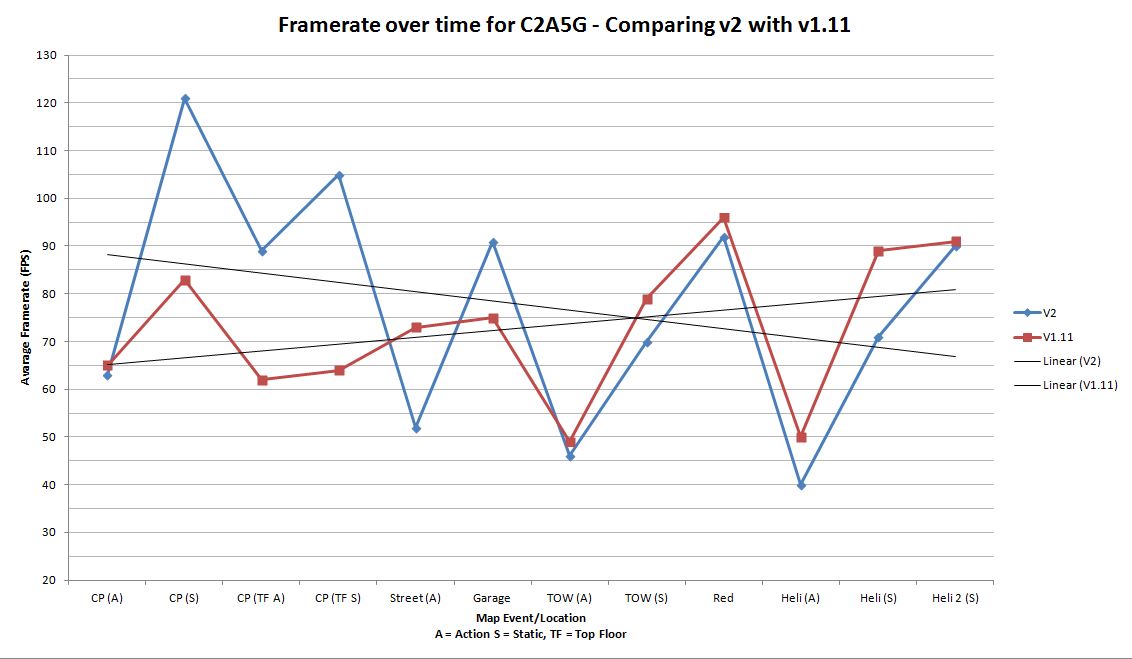
This might be a bit difficult to digest, so I broke it down into an Excel graph which would make a 15 year old studying maths very proud:

The large peaks and troughs on the graph are mostly moving from action to static scenes, which does naturally provide a significant difference in performance due to higher number of AI and effects on screen.

One of the interesting overall trends you’ll see on the graph is that the framerates for the action sequences are very similar for v2 and v1.11, aside from the street which is much worse performing in v2. This is probably because the cost of calculating the AI/effects from their fighting doesn’t really change from version to version.

We can see very clearly that the framerate in the Car Park in v2 is SIGNIFICANTLY improved. There is nearly a 35FPS gain when just running around the car park after the fight. The only time the framerate is lower in v2 is during the fight big fight in the Car Park, and that difference is so slight (2 frames) that we can probably chalk that one down to random variables.

I was surprised that the top floor of the car park runs better in v2. The new window should have hurt performance quite a bit. Likely the harm done by the new window forcing the outdoor area to render, is outweighed by the benefits brought on by optimization changes making the lower floors of the car park no longer render in v2. This is good.

The street battle (observed from the hole in the top floor of the car park) performs MUCH worse in v2, something which I hadn’t noticed or anticipated. This is probably because the TOW courtyard, which can be seen from there, is substantially more detailed than before. For my rig at the very least however, this is still well within acceptable bounds.

The Garage running better in v2 is something which surprised me too - considering I made the window leading to the TOW Courtyard transparent for v2. It most likely performs a lot better due to optimization changes I made to the TOW Courtyard using visleaves.

The TOW Courtyard, on average, runs a fair bit worse in v2 compared to v1.11, and still faces the same problem spots. For me, the average framerate during the fight with the Agrunts is 46 in v2, which is still acceptable - but might be very difficult for players with weaker rigs. Bear in mind the difference in action framerates between the two versions for the TOW courtyard is only 2 frames per second, however. When simply walking around the TOW Courtyard, the difference between the 2 versions is 9 FPS in favour of v1.11. This surprised me a bit - I was expecting v2 to run A LOT slower than a 9 FPS difference. Overall I consider this moderate performance drop to be acceptable given the very large increase in visual quality in the TOW Courtyard, though others may not consider that a good compromise.

The Helipad follows much he same trend, with the average difference in FPS being around 10 again.

Overall we can see that the two most improved areas visually by far (the TOW Courtyard and Helipad) have had a 10fps drop on average. This is good news for anyone who had decent framerates before - the new version shouldn’t cause too much of a problem with the game’s smoothness. For those of you with weaker rigs who were having bad framerate issues with v1.11 however, it may very well be wise to steer clear of v2, as it is overall more demanding later on into the map.

Comparing the linear trends (labelled as “linear” on the graph) you can look at the total area between the two lines to figure out how much performance has been gained overall with v2. The center point of the two lines (where they intersect) is the time at which the performance of v1.11 starts to be superior to v2’s performance. The triangular region to the left of that point is the time where v2’s performance is on average better than v1.11.

Comparing those two triangular regions, you don’t even need to precisely measure their area to see that v2’s “performance region” is significantly larger than v1.11’s. I would estimate around 1.5X. This means that in terms of overall performance looking at the level G as a whole, v2 DOES perform better overall, even if it does worse in the more intensive areas.

I’m pleased with this. It could be better, but I’m pleased with it.

Just played through your RC of ST Uncut 2.0 and I didn’t get any crashes at all (previously had only 2 crashes in the previous version without using the Animation Revamp Project).

Also, I thought you did a good job fixing up the Manta/Harrier scripting. It looks much better now.

Anyway, is it OK if I post a little bit of feedback before the final version is released?

Sure, provided there isn’t too much and it’s stuff that’s relatively easy to fix. I wasn’t saying “no feedback,” I was just saying - keep things simple at this stage because I want to move on. Filming the vid, getting the release polished and doing the benchmarks has actually taken up all of my day, so I will likely start B2 tomorrow - and I do think at this point I intend to revise the layout substantially.

I also haven’t heard anything about my “experimental changes” yet, from anyone but Chickenprot. Does anyone have anything to say about those?

Ok. I won’t post too much feedback.

Anyway, I thought it was cool that the vent pieces actually collide with the world now. I also thought you did a great job reworking the Manta/Harrier pathing.

I agree that it was a bit hard to see the Satchel/Marine with the new grate. Had to zoom in on him to get a better look. I definitely think you should change it back to the way it was in V2 Beta.

Founded in 2004, Leakfree.org became one of the first online communities dedicated to Valve’s Source engine development. It is more famously known for the formation of Black Mesa: Source under the 'Leakfree Modification Team' handle in September 2004.